
Badaga Script by Kadasoley Yogesh Raju

Yogesh prefers to call Badaga Language as BADUGU and has been a dedicated inventor of Badaga/Badugu Script for more than fifty years. See more about Yogesh here –https://badaga.co/2019/05/08/badugu-badaga-script/
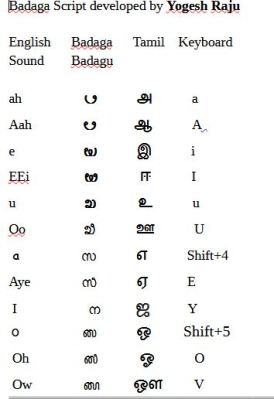
How to install Badaga font and type in the system – Step by step
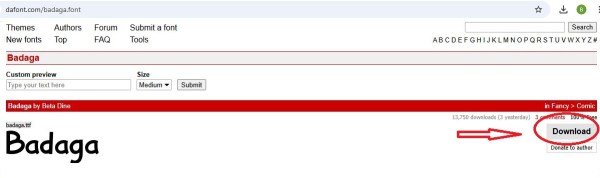
- Download Badaga Font (KBadaga3) from https://www.dafont.com/badaga.font . This small download is in zip ( unzip and install)
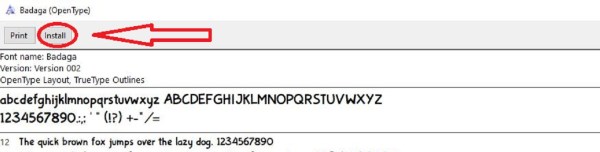
2. Install Badaga font
3. Download and Install Pada Pada Software For Indic Scripts in the system.
‘Pada Software’ is a Word processor for Indic Scripts, especially for Kannada script, ‘Pada‘ means a ‘Word‘ in the Indian language Kannada which is mainly used in the southern region of India. The software is a collection of tools for processing Indic scripts and is also suitable for BADAGA Script developed by Yogesh Raju. This has become possible courtesy Prof, K Rao of Manipal University.
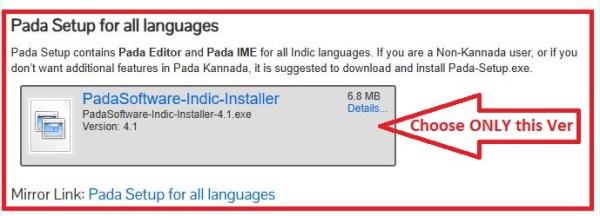
Click the download tab given above, Scroll down and choose the following version – PadaSoftware-Indic-Installer 4.1. https://www.pada.pro/download/ See the screen shot below.
Do not choose the later or other versions as it may not give the EXACT Badaga/Badugu script as developed by Yogesh.
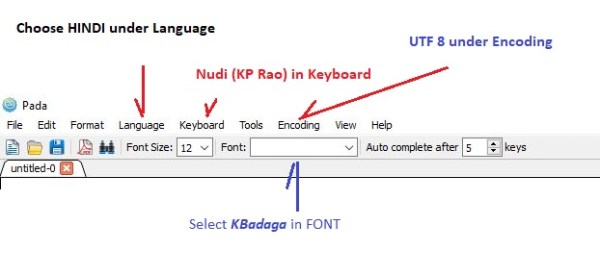
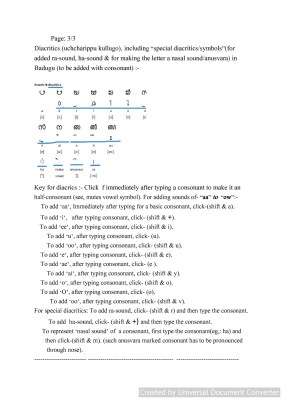
Choose the following Options from the drop down menu when you open Pada Software installed in the system. Language – Hindi, Keyboard – Nudi(KP.Rao), Encoding – UTF 8 & Font – KBadaga


Discover more from Badagas of the Blue Mountains
Subscribe to get the latest posts sent to your email.




 Mookuthi
  Chinna




 ==
==







 Badagas of the Blue Mountains